Visibility Diagnosis
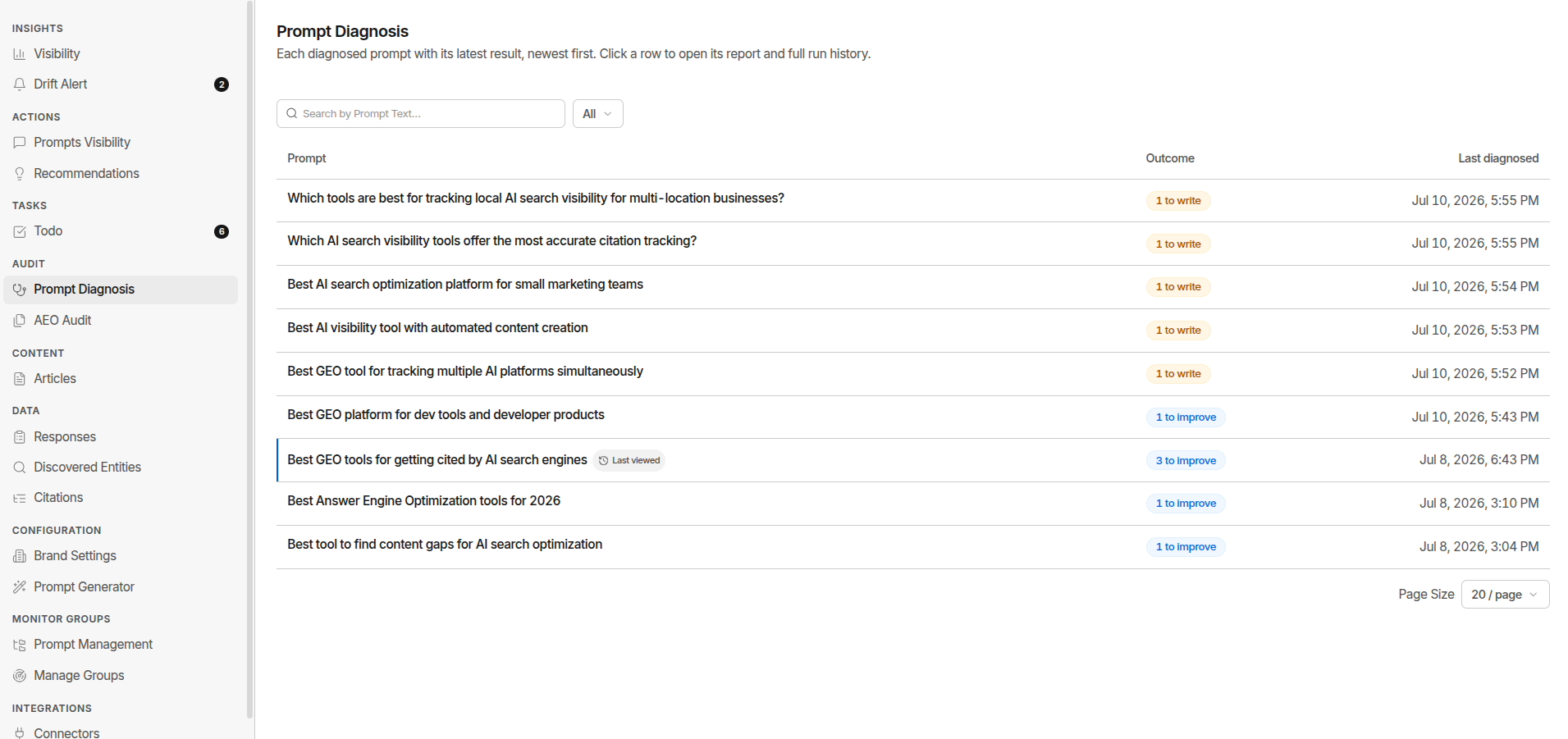
Visibility Diagnosis answers one question for a prompt where your brand isn't getting cited: why not, and what should I do about it? It turns a lost prompt into a specific piece of work - either a page to write or an existing page to fix.
What it does
An AI assistant doesn't search your prompt as written. It fans the prompt out into several smaller search queries, each covering a different angle, and answers from whatever it finds for those. Visibility Diagnosis reproduces that fan-out and checks you query by query.
For each fan-out query it decides whether you're covered, weak, or missing - and returns work for the ones you aren't winning:
| Coverage | You get | What it means |
|---|---|---|
| Missing - you have no page for that query | A content brief | An outline of the page to write to compete for it |
| Weak - you have a page, but it's losing | A gap report | Your page compared side-by-side with the competitor page winning, and what yours is missing |
| Covered | Nothing | You're already answering that angle |
One run can return both. A prompt that's partly covered gets briefs for the angles you're missing and gap reports for the ones you're weak on. If every query comes back covered, the run finishes with No action needed.
How it works
- Fan out the prompt into up to 5 search queries, combining the real search-mode queries captured from a live web search with generated ones covering other facets of the intent.
- Search your own site for each query.
- Read your actual pages (up to 3) and mark every query covered, weak, or missing - reading the real page text, not just a snippet.
- Pull the competitor citations for the prompt from the last 30 days of your monitoring, and keep only the ones that are genuine competitors.
- Branch per query:
- Missing → write a content brief for it.
- Weak → compare your page against the competitor page winning that query and write a gap report. GrackerAI also kicks off an AEO Audit on your page automatically, so its score is ready next to the gap report.
- Covered → nothing.
One report per fan-out query, so a run returns at most 5 reports in total - split between briefs and gap reports however the coverage falls. Five briefs and no gaps, two briefs and three gaps, one gap and nothing else: all normal. Near-identical briefs are merged before you see them, so a run can return fewer.
Fan-out queries are shaped as the three page formats that actually earn AI citations - listicles, comparisons, and blog answers. Pricing pages and documentation are deliberately excluded.
Because step 4 reads the competitor citations your monitors captured, a diagnosis is only as complete as your recent monitoring. If a prompt hasn't run lately, run its monitor first so the diagnosis has fresh citations to work from.
Running a diagnosis
- Find a prompt you're losing. Start from Lost Prompts or any prompt where a competitor is cited and you aren't.
- Run Visibility Diagnosis on that prompt - from the prompt itself, or from Audit → Visibility Diagnosis.
- Open the result. Each run shows what it produced: n to write, n to improve, or No action needed.
- Act on it - send a brief to Articles, or open View AEO audit on the page you need to improve and work the gap report against it.
Every diagnosis is saved as a run, so you can compare before and after. Diagnose again starts a fresh one. In Prompt Management, any diagnosed prompt expands on click to show the fan-out queries it was broken into.
Reading the results
Results are three levels deep: runs → the reports in a run → one report.
Content brief - "Write new page"
| Section | What it gives you |
|---|---|
| Title to use | The working title and meta description, with the page type and target word count |
| The answer to win | The answer your page has to own to earn the citation |
| Your angle to stand out | The differentiation angle against the page currently cited |
| Outline to write | Section-by-section outline |
| Points you must cover | Non-negotiable coverage |
| Claims to make | Citable claims - the statements that earn AI citations |
| Where the competitor falls short | Gaps in the page you're up against |
| Formats to use / Keywords | Page formats and the entities to name |
Gap report - "Improve your page"
| Section | What it gives you |
|---|---|
| What to do first | Prioritised fixes, each with an effort estimate |
| Topics to add | Coverage the competitor has and you don't |
| Structure to improve | Layout and extractability problems |
| Evidence to add | Missing stats, sources, and proof |
| Freshness | Your page's date against the competitor's |
Both views link out to your page and the competitor page cited. From a report you can Add task, generate the page in Articles ("Create new content" for a brief, "Improve existing" for a gap), or open the page's AEO Audit.
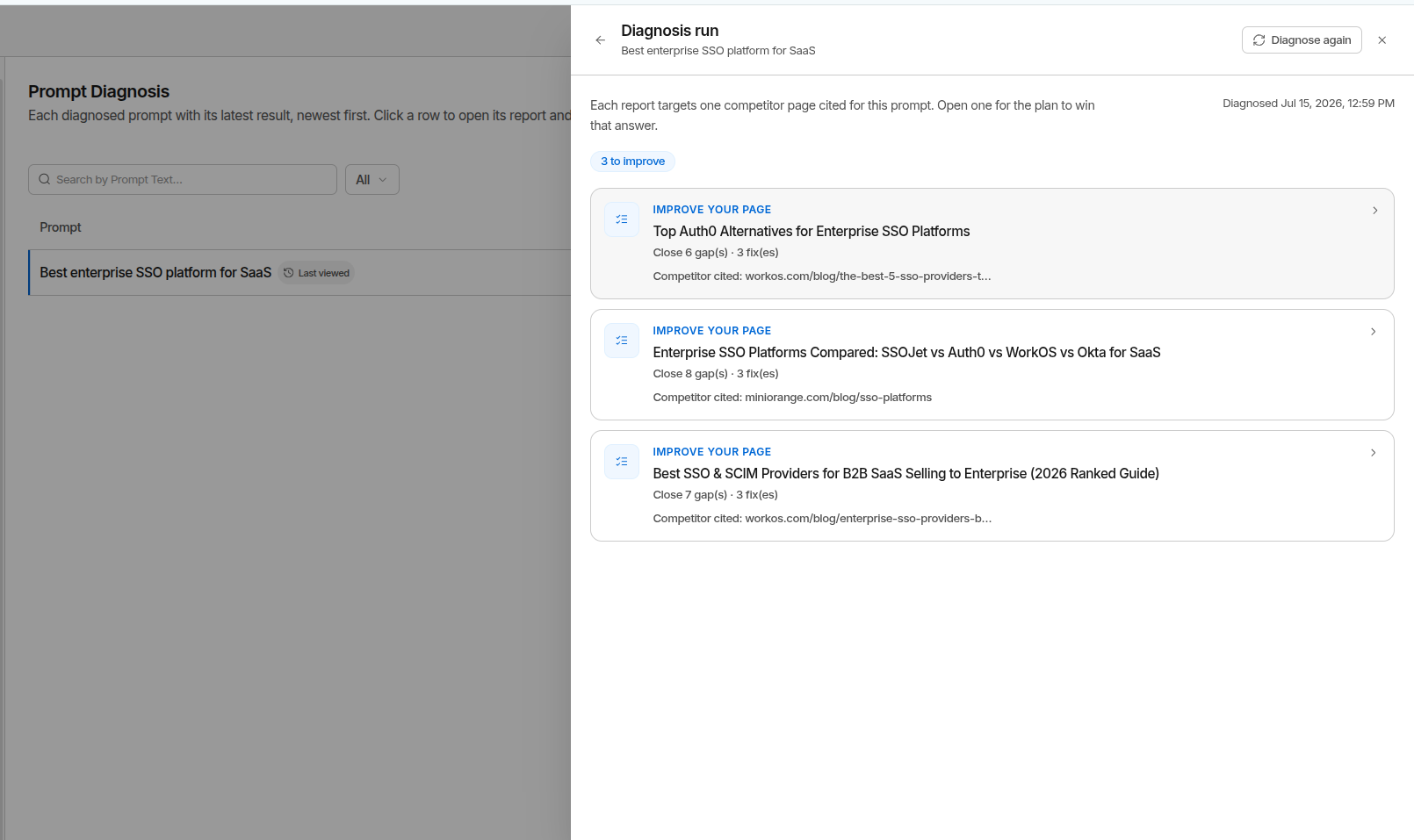
Find it: open any losing prompt → Diagnose, or Audit → Visibility Diagnosis
Where Visibility Diagnosis fits
Visibility Diagnosis is the bridge between seeing a gap and closing it.
- Prompt set unclear first? Prompt Diagnosis checks whether the prompt is worth tracking at all before you diagnose its visibility.
- No content? → Articles turns the brief into a draft.
- Have content? → the gap report shows what's missing; AEO Audit scores the page and Improve Visibility turns that into prioritised fixes.
- Zoom out with Content Gaps and Improve Visibility.
Limits & gotchas
- Diagnosis reads the competitor citations your monitors captured in the last 30 days. Run the prompt's monitor first if it hasn't run lately.
- It needs your competitors set up - it uses them to tell real rivals apart from incidental links.
- Every run is bounded: 5 fan-out queries, 3 of your pages read, and one report per query - 5 reports at most. Deep prompts get the highest-probability angles, not all of them.
- No competitor citations in the last 30 days → the run reports that rather than guessing.
- Results reflect the prompt at diagnosis time; re-run after you ship a fix to confirm you've closed the gap.